I Built a Free Calculator to Show You What Manual Work Actually Costs
Most teams have a rough sense that manual work is expensive. Few have ever put a number on it. When I ask founders and ops managers what repetitive tasks cost them, the answer is usually a shrug and “a lot.” That’s not a number you can make decisions with.
So I built a free automation ROI calculator to make it concrete. Three inputs, instant results, no email required. This post walks through the math behind it, because understanding the formula matters more than just seeing a number.
Where the 65% figure comes from
Every job has two kinds of work. There’s the repeatable stuff (data entry, status updates, report generation, invoice processing) and the non-repeatable stuff (judgment calls, strategy, relationship management, anything that changes every time). Automation only applies to the repeatable portion. A senior ops manager might spend 60% of their week on non-repeatable work, and none of that is in scope.
Within the repeatable portion, not everything is automatable either. Pure data movement between systems is close to 100% automatable. Tasks that require interpretation or human context bring the average down. Across the operations teams I work with, 65% of the repeatable portion is consistently automatable with current tools. I use that number because it holds up in practice, and overpromising helps nobody.
That’s what the calculator captures. When it asks for “hours per week on manual tasks,” you’re entering the repeatable portion, not your total working hours. The 65% applies to that input.
This is the same pattern Randall Munroe captured in XKCD 1205: a table showing how much time you can justify spending on automation based on how often a task runs and how much time it saves per occurrence. The math is simple multiplication. The insight is that small savings on frequent tasks compound faster than most people expect.
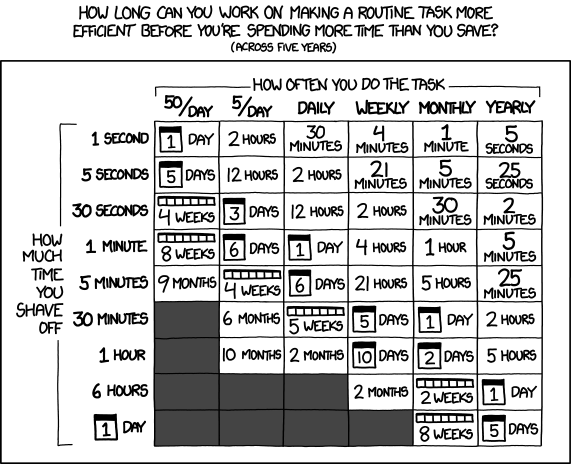
What XKCD 1205 doesn’t account for is error reduction, consistency, and the cognitive load of context-switching between repetitive tasks and actual strategic work. The real value of automation is often larger than the time savings alone, but time is the easiest variable to measure, so that’s what the calculator focuses on.
How the calculator works
The formula is straightforward:
Monthly hours on manual work = team members x weekly hours per person x 4.33 weeks per month
Hours recovered per month = monthly hours x 0.65
Annual value recovered = hours recovered x 12 months x loaded hourly cost
Payback period = typical automation build cost (the calculator uses a mid-range figure of 2,500 euros) divided by monthly value recovered
The loaded hourly cost is important. This isn’t the employee’s take-home rate. It includes salary, benefits, office costs, management overhead, and tools. For most European SMEs, a team member with a 45,000 euro salary has a loaded cost somewhere between 35 and 55 euros per hour. The calculator defaults to 45 euros, but you should adjust it to your actual numbers.
Three scenarios with real numbers
Scenario 1: 3-person ops team at a marketing agency
A small agency has three people spending about 10 hours each per week on repetitive tasks: client reporting, campaign status updates, invoice processing, and data entry between platforms.
- Monthly manual hours: 3 x 10 x 4.33 = 130 hours
- Hours recoverable: 130 x 0.65 = 84 hours per month
- Annual value at 45 euros/hour: 84 x 12 x 45 = 45,360 euros
- Payback period: 2,500 / (84 x 45) = 0.7 months
That’s 84 hours per month the team gets back. Almost a full-time equivalent, from a 3-person team. The payback period is under three weeks.
Scenario 2: 10-person logistics ops team
A mid-sized logistics company has 10 people in operations, each spending about 15 hours per week on manual work: order processing, shipment tracking updates, carrier communication, and exception handling.
- Monthly manual hours: 10 x 15 x 4.33 = 650 hours
- Hours recoverable: 650 x 0.65 = 422 hours per month
- Annual value at 40 euros/hour: 422 x 12 x 40 = 202,560 euros
- Payback period: 2,500 / (422 x 40) = 0.15 months
Over 400 hours per month. That’s 2.5 full-time equivalents worth of capacity recovered, without hiring anyone. The build pays for itself in under a week.
Scenario 3: 5-person finance and admin team at a professional services firm
Five people handle invoicing, expense processing, timesheet reconciliation, and client billing. Each spends about 8 hours per week on tasks that follow consistent rules.
- Monthly manual hours: 5 x 8 x 4.33 = 173 hours
- Hours recoverable: 173 x 0.65 = 112 hours per month
- Annual value at 50 euros/hour: 112 x 12 x 50 = 67,200 euros
- Payback period: 2,500 / (112 x 50) = 0.45 months
The higher hourly cost reflects the seniority of people doing this work. Senior staff doing data entry is the most expensive form of manual work, because you’re paying expert rates for mechanical tasks.
When building it yourself costs more than it saves
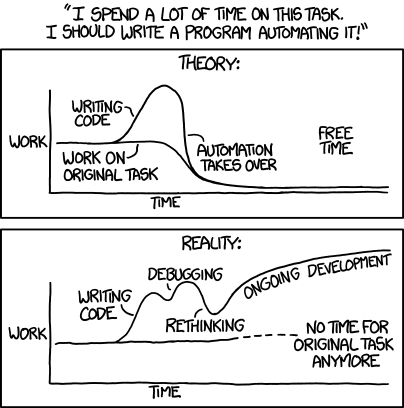
None of this is an argument against building automation yourself. But before you start, run the same math in reverse: if your team spends 200 hours building and debugging an automation that saves 10 hours a month, you won’t break even for nearly two years. That’s the pattern XKCD 1319 captures. A task that should take a day turns into weeks of scope creep and edge cases, while the original manual work piles up.
Why most teams underestimate the cost
Three reasons teams consistently underestimate what manual work costs them:
They count hours but not value. Ten hours a week on data entry doesn’t feel like much until you multiply it by the loaded hourly cost, the number of people doing it, and 52 weeks. Then it’s a six-figure line item.
They don’t see the compounding. Manual work scales linearly with volume. More clients means more invoices, more reports, more status updates. Automation scales flat: the system handles 10 or 100 with the same effort. The gap between manual and automated cost widens every month the business grows.
They adapt to the friction. When a team has been doing something manually for long enough, it stops registering as a problem. It’s just how things work. The cost becomes invisible because nobody is tracking it separately.
What to do with your number
The calculator gives you a starting point, not a project plan. Knowing that manual work costs your team 50,000 euros a year doesn’t tell you which tasks to automate first, what tools to use, or what the build would look like. But it does tell you whether the conversation is worth having.
If the annual value is in the tens of thousands, automation is almost certainly worth exploring. If the payback period is under a few months, the risk is minimal.
The next step is figuring out which specific workflows to target. That’s what an operations audit is for: we meet with your team, map your actual processes, identify the highest-impact candidates, and give you a ranked set of recommendations. If there’s nothing worth automating, I’ll tell you that.
Run the numbers for your team, then book an operations audit to see exactly where to start.